

Audit Logs
Track a record of actions taken across your projects
Audit logs give administrators visibility into everything happening across your ReadMe group including who made changes, when, and to what. Use them to investigate unexpected changes, meet compliance requirements, or keep a pulse on team activity.
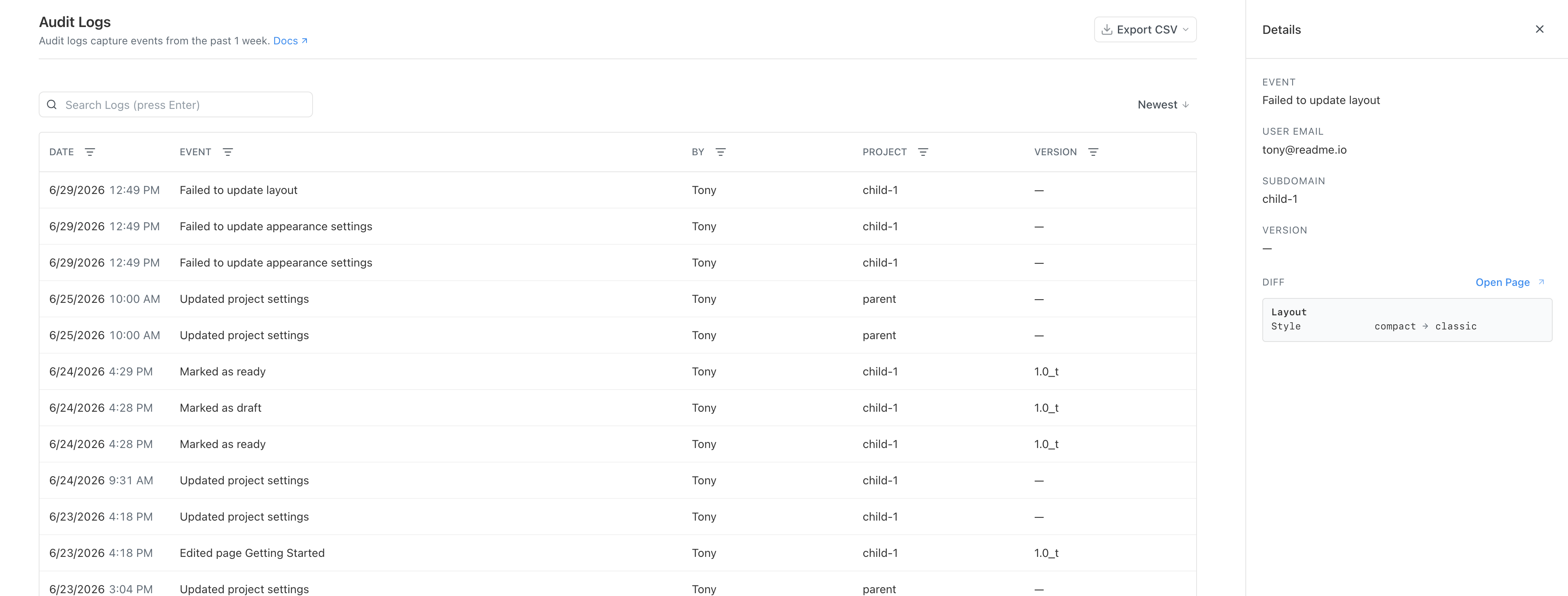
Audit Log Table
To access audit logs, go to your Enterprise Group Dashboard and select Audit Logs from the sidebar.
The log table shows the following columns:
- Date - when the event occurred
- Event - a description of what happened
- By - the teammate or system actor who triggered it
- Project - which project or group was affected
- Version - the version or branch involved (if applicable)
Click any row to open a detail panel with the full event context.
Search and Filter
Use the search bar to find events across your full audit log history. You can also filter results by one or more of the following: Date, Event, By, Project, or Version. You can select multiple filters and search to narrow down options.
Export CSV
Click Export CSV in the top-right corner of the Audit Logs page to download your log data. Apply filters first to export a specific subset, or export all logs at once.
Updated 3 months ago