

Documentation Structure
Learn about how we've structured our documentation for two-way syncing
Project structure
Each ReadMe project will be equivalent to a GitHub repository. See the diagram below:
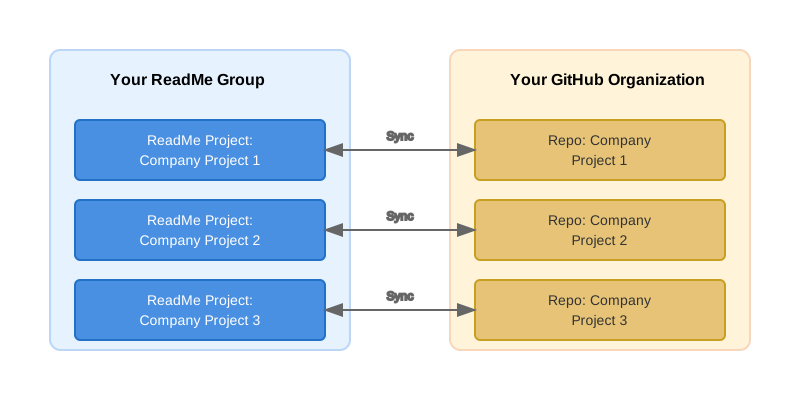
Branches within a project are branches in Github: each Git branch maps 1:1 to a ReadMe version or branch.
File Organization
The bi-directional sync format closely mirrors the ReadMe project structure. Folders organize your documentation, and markdown files serve as pages:
📂 project
├── 📁 changelogs
├── 📁 custom_blocks
├── 📁 custom_pages
├── 📁 docs
│   ├── 📂 category-folder
│   │   ├── 📄 page.md
│   │   ├── 📂 page-with-subpages
│   │   │   ├── 📄 index.md      ← required for subcategory or lower
│   │   │   ├── 📃 _order.yaml   ← orders the subpages below
│   │   │   ├── 📄 subpage-a.md
│   │   │   └── 📄 subpage-b.md
│   │   └── 📃 _order.yaml
├── 📁 recipes
└── 📁 reference
Each component serves a specific purpose:
changelogs: Holds your Changelog entries, one Markdown file per entry. This folder is flat — Changelog entries have no categories and no_order.yaml, and are ordered by theirpublished_atdate.custom_blocks: Stores any custom blocks you've created.custom_pages: Stores any custom pages you've created.docs: Contains your main documentation content, organized in categories.recipes: Holds step-by-step tutorials and how-to guides.reference: Contains API reference documentation._order.yaml: Manages the sidebar order for each section.
None of the above folders are mandatory, they only exist once you're using that feature.
Changelog entries behave a little differentlyChangelog entries are unversioned — they live only on
mainand don't fork when you create a new version. Only English entries are represented in your repository; if you publish translated Changelog entries, those are managed outside of Git Sync.
Folders as pages with subpages
Every _order.yaml file is a flat list of slugs, with no file extension:
- get-started-with-file-sorting
- advanced-sorting
- sorting-compatibility
Each entry is resolved against the same folder:
- Matches a
.mdfile: a plain page with no children. - Matches a folder: a page with subpages. That folder needs:
- any subpages with .md extensions, or subfolders
index.md, if the child folder itself has Markdown content_order.yamlto organize the sidebar
📂 get-started-with-file-sorting
├── 📄 index.md      ← "Get started with file sorting" page content
├── 📃 _order.yaml   ← [plan, frameworks...]
├── 📄 plan.md
├── 📄 frameworks.md
└── ...
keepindex.mdout of_order.yaml
_order.yamlmust never contain anindexentry, it is implied by the existence of anindex.mdfile in that folder.
Nesting limitThe sidebar supports up to 5 levels of nesting. Folders nested deeper than that are not reflected in the rendered sidebar.
API Reference section
/reference/ follows the same pattern. Uniquely, a folder generated from an OpenAPI specification tag with more than one operation gets its own index.md file that looks like this:
---
title: owls
hidden: false
---
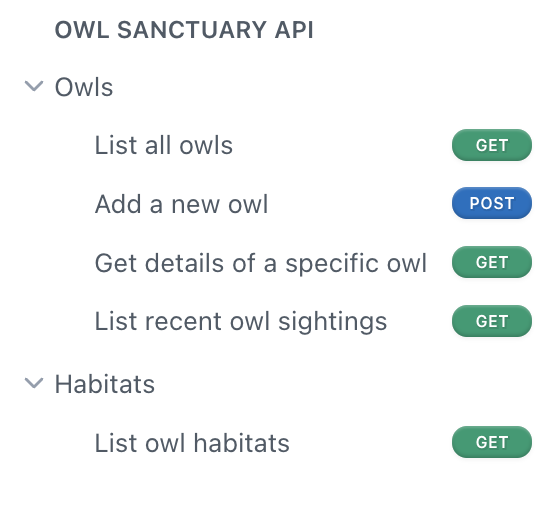
For example, after uploading an OpenAPI specification file, hoot.json, with a title of "Owl Sanctuary API" and an owls tag containing several operations, you'd get:
📂 reference
├── 📃 _order.yaml            # - Owl Sanctuary API
└── 📂 Owl Sanctuary API
    ├── 📃 _order.yaml         # - owls
    └── 📂 owls
        ├── 📄 index.md        # title: owls
        ├── 📃 _order.yaml     # - postowls, - getsightings, ...
        ├── 📄 postowls.md
        └── 📄 getsightings.md
The above matches the following sidebar:
File Format
Frontmatter shape depends on what kind of file you're editing and are distinct per content type.
Pages
Used for docs/, recipes/, and reference/ index/leaf pages:
---
title: string # Title of the page
excerpt: string # Text displayed under title
deprecated: boolean # Mark page as deprecated
hidden: boolean # Visibility of page
icon: string # Font Awesome classes for icons ("fad fa-handwave")
metadata:
  title: string # SEO title
  description: string # SEO description
  keywords:
    - string
  robots: index | noindex # Whether this page should be indexed
  image: url
next: # Optional "what's next" recommendations
  description: string
  pages:
    - type: basic
      slug: string
      title: string
---

# Main Content

Your documentation content goes here…
API Reference endpoints
---
hidden: boolean
api:
  file: string # the OpenAPI spec file name present in /reference ("hoot.json")
  operationId: string # Endpoint ID ("get_owls")
  webhook: boolean # If endpoint is a webhook
---
Updated formatPlease note that
titleandexcerptfields are no longer present in API reference frontmatter, as these fields are now taken directly from the OpenAPI endpoints referred to by thefileandoperationIdfields in order to reduce duplication of data.
Changelogs
---
title: string        # Title of the changelog post
author: string       # Author name displayed on the post
date: string         # Publish date (e.g., "2025-01-15")
type: string         # Post type: Added, Fixed, Improved, Deprecated, Removed
hidden: boolean      # Visibility of the post
---
Changelogs are unversioned and live only on main. Committing a changelog file to a branch does not surface it in ReadMe. The publish date drives ordering across the changelog list, sidebar, RSS feed, sitemap, llms.txt, and the API.
Custom blocks
---
name: string
---
Custom pages
---
title: string
fullscreen: boolean
---
Link pages
---
title: string
link:
  url: url
  new_tab: boolean
---
Updated last month