

Ask AI
An AI assistant embedded in your docs that answers your users' questions.
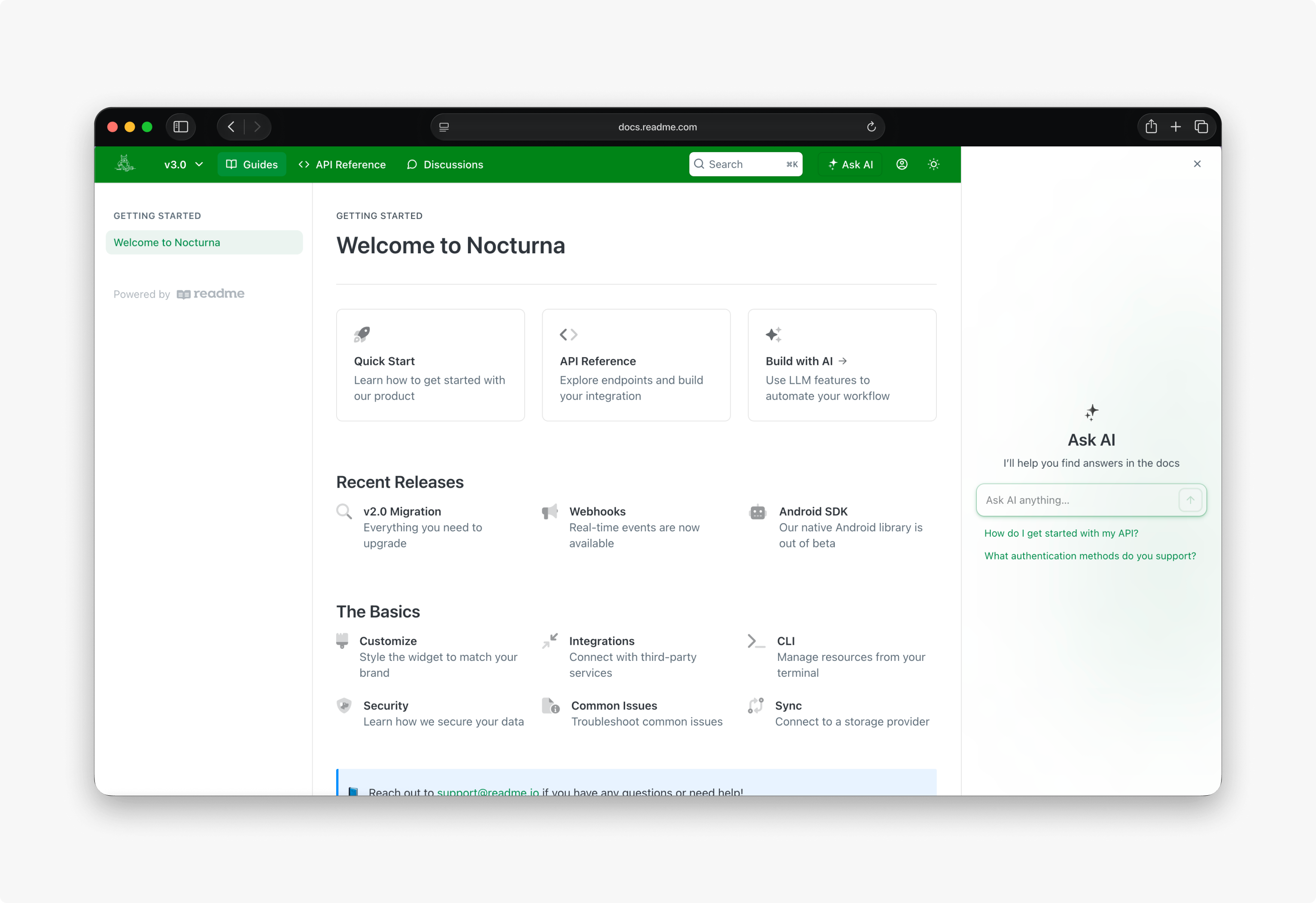
Ask AI gives your users instant answers from your published documentation, directly inside your hub. It appears on every page — a user types a question, gets a response grounded in your content with links to the source pages, and keeps moving without opening a support ticket. You control the tone, answer length, forbidden topics, and example questions. Analytics show what users are asking, so you can identify gaps in your docs.
Plans & Availability
Ask AI is available as an add-on for any customer, or as a simplified built-in experience for Pro and Enterprise plans.
- Ask AI (add-on) — Includes full customization (tone, answer length, forbidden topics, example questions, model selection) and access to Analytics. Available as a purchasable add-on to any customer for $150/month.
- Ask AI Lite — Included automatically for customers on the Pro ($250/month) and Enterprise plans. The name doesn't mean weaker answers: Lite runs the same default model every ReadMe hub gets, so response quality is identical. What Lite leaves out is customization (tone, answer length, forbidden topics, example questions), model selection, Analytics, and API access. If you don't need to choose your own model or customize the surface, Ask AI Lite already gives you complete answers.
The Ask AI API is available on Enterprise plans only, and is not included with the add-on.
Getting Started
Once the add-on is purchased, Ask AI is ready to configure and enable. To set up Ask AI:
- Open AI → Ask AI in your project settings.
- Set the assistant's tone, answer length, and forbidden topics.
- Add example questions that users see when they first open Ask AI.
- Select a model.
- Click Save.
Configure
Customize Ask AI from AI → Ask AI:
- Tone — The voice of the assistant (formal, friendly, neutral).
- Answer length — How detailed responses are.
- Forbidden topics — Subjects the assistant will not address.
- Example questions — Prompts users see when they first open Ask AI.
- Knowledge — Custom knowledge that Ask AI can reference when answering questions. This is useful for adding context that isn't in your published docs, such as internal policies or product details. Capped at 100,000 characters.
- Model — Which AI model generates responses. You can select specific models via the advanced options, or allow ReadMe to automatically update you to use the latest recommended models for you as they release.
- Custom Prompt — Implement an entirely custom prompt to overwrite the default ReadMe prompt. This allows maximum customization of your Ask AI experience.
Latest Ask AI Model Selection
Selecting any of the "Latest" AI models from the Ask AI settings will allow ReadMe to automatically update the model used in Ask AI to those performing best in the ReadMe internal testing suite.
We prioritize a balance of speed and accuracy when determining the model choice. If you would like to exclusively use models from a specific provider, select the latest model option for that provider.
Ask AI Placement
Customize the placement of Ask AI from Appearance -> Ask AI. Select one or more of:
- Header — An Ask AI button in the header, next to the search button.
- Bottom Float — A floating input box at the bottom of the screen.
- Embedded in Search — only available for the Modern search modal type. Upon inputting a search term, recommended questions to use in Ask AI will populate. On selecting one of these questions, the search modal will close and the question will be sent to Ask AI.
Enterprise Groups
Group-level configurations for Ask AI — such as tone, answer length, forbidden topics, and model — apply across all child projects. Set them in your Group Dashboard.
Ask AI placements must be made from child projects.
For Enterprise groups, Ask AI searches across all projects in the group whenever a question is asked from any project within the group. Source citations include the project each answer was drawn from, so users can navigate directly to the relevant documentation.
The cross-project search can be disabled by enabling "Project Scoped Knowledge" from the enterprise group Ask AI settings.
Analytics
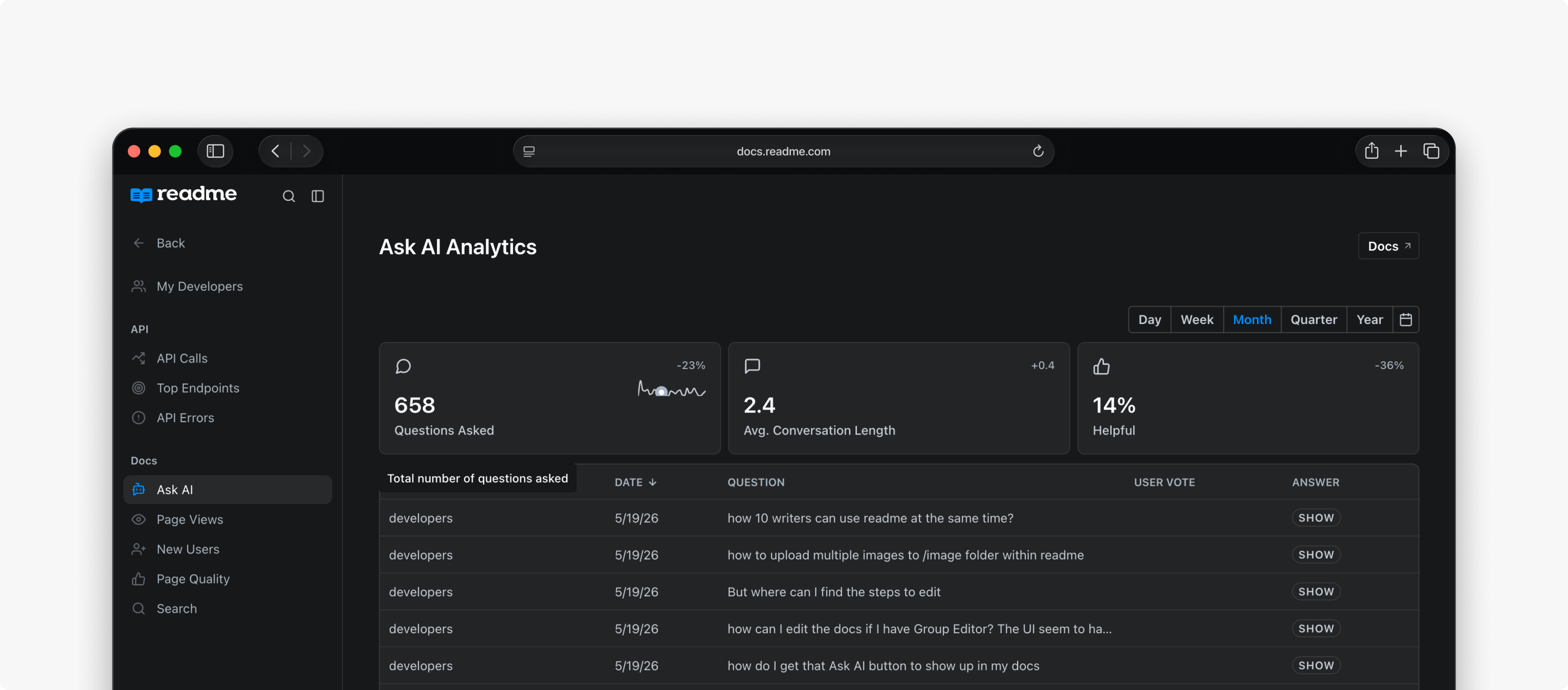
The Ask AI dashboard shows what users are asking and how the assistant is performing. Open it from Analytics → Ask AI. Only project admins can access Ask AI analytics and export logs.
- Questions — Every question users have asked.
- Responses — The AI-generated answers.
- Model — The AI model that generated each response.
- Feedback — Thumbs up/down ratings from users.
- Export — CSV download with custom date ranges (Enterprise only).
Example
A developer building against your API visits your docs and asks:
"How do I authenticate with OAuth? I need to get an access token for server-to-server calls."
Ask AI searches your published documentation, finds your "Authentication" guide and the OAuth section of your API Reference, and responds:
"To authenticate with OAuth for server-to-server calls, create a client credentials grant by POSTing to
/oauth/tokenwith yourclient_idandclient_secret. The response includes anaccess_tokenvalid for 3600 seconds. See Authentication > OAuth for the full flow and POST /oauth/token for the endpoint details."
The response includes direct links to the source pages. The developer clicks through, reads the full guide, and starts building — without opening a support ticket or searching through 50 pages.
If a question comes up repeatedly in your analytics, it's a signal that a page is missing or unclear.
Data RetentionAsk AI logs are retained for 60 days. Analytics and CSV exports will only include data from the last 60 days.
FAQ
What happens to my data?
Ask AI supports multiple AI providers, including OpenAI, Anthropic, and Google Gemini. Your Markdown content and API definitions are sent to the selected provider to generate answers. No provider uses this data for model training.
What content does Ask AI search?
Ask AI searches your stable version's Guides, API Reference pages (both narrative pages and endpoints), Recipes, and any custom knowledge you've added.
Does Ask AI reference hidden pages or sections?
No. Hidden pages and content from navigation sections you've turned off in your Site Navigation settings are excluded from Ask AI answers. For Enterprise groups, answers are scoped to content the user has access to.
How quickly are documentation changes reflected?
Content is re-indexed every 2 hours.
How can I try Ask AI?
Test it on ReadMe's own docs, or enable it on your project as a trial.
What plan do I need?
Ask AI is available as an add-on to any plan for $150/month. Ask AI Lite is included free on the Pro and Enterprise plans and uses the same default model, so you're not getting a weaker assistant — the add-on buys model selection and surface customization, not better answers.
Updated 7 days ago