

ReadMe CLI (@readme/cli)
Lint your docs, validate OpenAPI files, sync reference pages, preview locally, and set up CI checks from the terminal with @readme/cli.
@readme/cli is the command-line tool for ReadMe projects that use bi-directional sync. It runs against the cloned docs repository on your machine or in CI, and it doesn't upload anything: publishing happens when you merge. It does three jobs. It lints your pages before they reach the hub, it validates your OpenAPI documents, and it keeps your API Reference in step with those documents by creating a Markdown page for every endpoint you add and removing the page for every endpoint you delete. If you sync an OpenAPI document through Git, run oas:sync after every change to it.
If your project pushes content to ReadMe with rdme instead of syncing a repository, this isn't your CLI. See rdme CLI and GitHub Action Reference.
Which CLI Should I Use?
Use @readme/cli if your docs live in a Git repository synced with ReadMe (Bi-Directional Sync). It lints your pages, validates OpenAPI documents, keeps your API Reference in sync with those documents, and previews changes locally before you push. Publishing happens when you merge.
Use rdme if you push content to ReadMe from CI or your terminal without a synced repository. See rdme CLI and GitHub Action Reference.
Prerequisites
- A ReadMe project with Bi-Directional Sync enabled. Sync is available on Starter, Pro, and Enterprise (checked against readme.com/pricing on September 16, 2026).
- A local clone of the synced repository, checked out to the branch that holds your docs. ReadMe writes each docs version to a Git branch with the same name, so a project on version v1.0 syncs to a branch called v1.0, and the repository's main branch may be empty. After checkout, ls should show a
docs/folder, areference/folder, or both. - Node.js 22 or later, and npx. Most commands read the project from the repository, so run them from inside the clone.
Running the CLI
No install step is required:
npx @readme/cli lint
npx @readme/cli oas:validate
npx @readme/cli oas:sync
The above three commands represent the essential workflow for validating your bi-directional sync file system and creating/pruning any endpoints added or removed from your OpenAPI specifications. If you run these three commands and they all pass, you're likely good to sync. That said, we always recommend syncing to a feature branch to do a final QA check before merging.
Commands
| Command | What it does | Runs where |
|---|---|---|
lint | Checks frontmatter, slugs, links, content, and structure across the repository. See Lint for the full list. | Local or CI |
lint --fix | Runs lint and rewrites the deterministic findings in place | Local |
lint --json | Runs lint and prints the results as JSON, for automation | Local or CI |
lint --github | Runs lint and prints the results as a pull request comment in Markdown | CI |
oas:validate | Validates the OpenAPI documents at the top level of reference/ and exits non-zero on errors | Local or CI |
oas:sync | Creates or updates API Reference pages from the OpenAPI documents in the repository | Local |
dev | Starts a local preview server with hot reload. Beta. | Local |
dev --port 3000 | Same, on the port you choose | Local |
setup, setup:ci | Detects your CI platform and writes a workflow that runs lint on every pull request | Local, once |
setup:github | Writes a GitHub Actions workflow that runs lint on every pull request | Local, once |
setup:github --blacksmith | Same workflow, on Blacksmith runners | Local, once |
setup:gitlab | GitLab CI equivalent of setup:github | Local, once |
setup:bitbucket | Bitbucket Pipelines equivalent | Local, once |
setup:circleci | CircleCI equivalent | Local, once |
setup:rwx | RWX equivalent | Local, once |
versions | Lists the project's versions and branches | Local or CI |
help | Prints the command list | Anywhere |
Global Flags
| Flag | Effect |
|---|---|
--no-check | Skips the check that the current directory is a ReadMe docs repository |
-v, --version | Prints the CLI version |
-h, --help | Prints help for the command |
Lint
lint is the command the setup:* workflows install. It reads every page in the repository and reports findings by file and line.
| Area | What lint checks |
|---|---|
| Frontmatter | Invalid YAML, unknown properties, misspelled properties |
| Slugs | Duplicate slugs, badly formed slugs |
| Content | Empty pages, invalid MDX-ish, broken recipes, content that won't be shown (for example, body text on a redirect page), missing MDX components |
| Structure | Folder structure, sidebar nesting limits (up to 5 levels), missing or stale _order.yaml |
npx @readme/cli lintAdd --json for machine-readable output, or --github to print the findings as a pull request comment in Markdown, which is what the generated CI workflow posts.
A clean run exits 0. Each finding prints with its severity, the file path, and a message, and OpenAPI errors also show the lines around the problem. Any error makes the process exit non-zero, which is what fails a pull request check. Warnings alone still exit 0.
lint --fix corrects the findings that have exactly one right answer, such as frontmatter formatting, and leaves the rest for you. Run it locally before pushing, then commit the result.
📘 lint and the AI Linter are different tools. lint checks structure and validity in the repository. The AI Linter checks prose against your style rules on the published hub. A page can pass one and fail the other.
Validate and Sync OpenAPI Documents
oas:validate checks every JSON or YAML OpenAPI document at the top level of reference/. It takes no file argument, and specs in subfolders of reference/ aren't checked.
npx @readme/cli oas:validateAdd --dereference to also resolve every $ref, which is the same check ReadMe runs when the spec reaches the server. The command exits 0 when every spec is valid and 1 when any has an error. You don't need a separate CI step for it: lint runs the same validation and fails the pull request on a broken spec.
oas:sync reads the OpenAPI documents at the top level of reference/ and creates a Markdown page for every endpoint in the document, updates pages whose endpoint changed, and deletes pages whose endpoint was removed, one page per operation, with frontmatter linking each page to its spec. Run it after adding or changing a spec, then commit the generated pages.
npx @readme/cli oas:syncFor the full workflow from spec to a synced Try It! console, follow Keep Your API Docs Synced With OpenAPI.
Preview Docs Locally
dev serves your Guides and API Reference from the files in your clone, and reloads the browser the moment you save a file. You see the rendered page before it becomes a commit, without waiting for a branch preview.
- From inside the clone, on your version's branch, start the server:
npx @readme/cli devThe first run downloads the CLI. When the server is up, it prints:
Dev server is running!
Changes to your files will auto-reload.
→ http://localhost:4523- Open http://localhost:4523. It lands on your first Guides page, with Docs, Reference, and Recipes tabs in the header and a dev server BETA badge.
- Open any file under docs/ in a text editor, change a word, and save. The browser reloads with the change as soon as the file is written; there's no build step.
- Stop the server with Ctrl+C.
To run on a different port:
npx @readme/cli dev --port 3000What Renders Locally
The dev server is in beta. It has your files and nothing else, which is why it starts in a second and also why some of the hub doesn't render.
| Section | Local dev server | Hub |
|---|---|---|
| Guides, including MDX and custom components defined in the repository | Full render | Full render |
| API Reference endpoint pages | Method, path, and response codes from the OpenAPI document, with a notice that the full reference renders in ReadMe | Request and response schemas, code samples, authentication, Try It! |
| Try It! | Not available | Available |
| Personalized Docs and My Requests | Not available | Available to logged-in developers |
| Recipes | Falls back to raw source with an "Error rendering MDX" message | Full render |
| Changelog, Custom Pages, theme, navigation, Ask AI | Not rendered | Rendered |
Try It! needs your API and the reader's credentials, Personalized Docs needs the reader's identity, and Ask AI needs the hub's index. For those, push to a branch and use the branch preview ReadMe builds at /your-branch/update/ where the full hub renders. The local server is for the edit-save-look loop before that push.
Set Up CI
setup writes a workflow file that runs lint on every pull request. Run it once, from the repository root:
npx @readme/cli setupIt detects your CI platform from the repository, tells you which one it found, and asks you to confirm before writing anything. To skip detection, name the platform directly. Each one writes a different file:
| Command | Platform | File Written |
|---|---|---|
setup:github | GitHub Actions | .github/workflows/readme-lint.yml |
setup:gitlab | GitLab CI | .gitlab-ci.yml |
setup:bitbucket | Bitbucket Pipelines | bitbucket-pipelines.yml |
setup:circleci | CircleCI | .circleci/config.yml |
setup:rwx | RWX Mint | .mint/readme-lint.yml |
| Flag | Effect |
|---|---|
--blacksmith | Use Blacksmith runners. GitHub Actions only. |
-y, --yes | Skip the confirmation prompt |
npx @readme/cli setup:github --blacksmith
npx @readme/cli setup:gitlab -y
Commit the generated file. From the next pull request, lint runs as a check, including OpenAPI validation. You can edit the generated file to add steps, but re-running setup replaces it: without -y it asks before overwriting, and with -y it overwrites without asking.
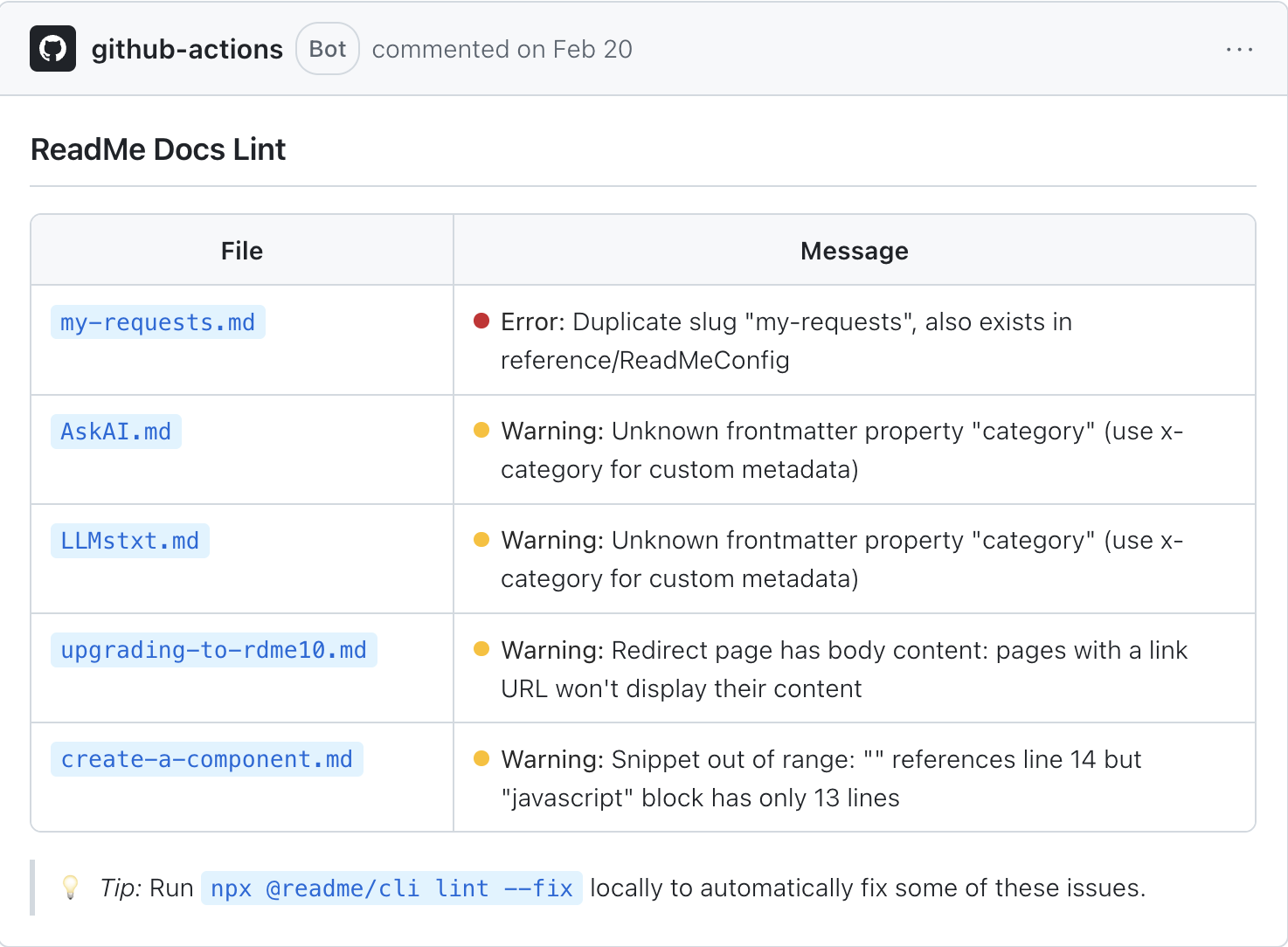
The comment lint posts on a pull request when it finds errors or warnings.
Components
components works with MDX components from the terminal: browse the component library, install one into your repository, or generate a new one. It's in beta.
npx @readme/cli components --help| Flag | Effect |
|---|---|
-f, --force | Refetch the component library from GitHub instead of using the 24-hour cache |
--model name | Model used by new to generate a component: haiku, sonnet, or opus. Default sonnet. |
-y, --yes | Overwrite existing files without prompting |
For what a component is and how it's used in a page, see Custom Components.
Troubleshooting
This doesn't look like a ReadMe docs repo. The message lists what the CLI couldn't find: a version branch (such as v1.0), a docs/ or reference/ folder, or both. You're usually on main in a repository where ReadMe syncs to a version-named branch. Run git branch -a, check out the branch named after your docs version, and try again. If every branch is empty, the ReadMe project has no pages yet; add one in the editor, then git pull. --no-check skips this check, but it doesn't help oas:validate, oas:sync or dev, which need the reference/ or docs/ folder to work with.
error: too many arguments for 'oas:validate'. oas:validate doesn't take a file path. Put the spec at the top level of reference/ and run npx @readme/cli oas:validate with no arguments.
oas:sync or oas:validate didn't pick up my spec. Both read only the top level of reference/, so a spec in a subfolder is skipped. oas:sync also silently skips a file it can't parse as YAML or JSON. It doesn't skip a document that parses but fails validation: it generates pages from it anyway, so run oas:validate before oas:sync.
lint passes locally and fails in CI. The CI job is on a different commit. Confirm the workflow checks out the pull request's head and that you pushed after running lint --fix.
Re-running setup replaced my workflow changes. setup writes a fresh workflow file every time. Without -y it asks before overwriting the existing file; with -y it overwrites without asking. Keep your own CI steps in a separate workflow file, or re-apply them after running setup.
Commands fail to start. @readme/cli requires Node.js 22 or later. Run node --version, and upgrade if it's older than 22.
The dev server port is already in use. Another process has 4523. Start with a different one: npx @readme/cli dev --port 3001.
A Recipes page on the dev server shows raw MDX, or an endpoint page shows only the method, path, and response codes. Both are expected in the current beta. See What Renders Locally.
Updated 25 days ago